Rask AI Alternatives 2026: ElevenLabs vs HeyGen by Plan
Short answer: if you're shopping for Rask AI alternatives, the right switch depends on what Rask is not doing for you. If you mostly need a translated voice track (podcasts, voiceover, narration), look at ElevenLabs. Its pricing page lists Dubbing Studio from the $6 Starter plan. If you need the presenter's mouth to match the new language on talking-head video, look at HeyGen, which markets its AI Dubbing as lip-synced. Its pricing page lists paid plans from $29/month, but doesn't say which paid plan includes full lip-sync translation. If you need lip-sync and bulk minutes for a whole library, Rask's own Creator Pro plan may still be the better fit. Details and sources are below.
How we checked this (method)
- Researched, not hands-on. We did not dub any video with Rask AI, ElevenLabs, or HeyGen for this page. No quality or speed test results appear here.
- We captured each vendor's public pricing page without signing in, on September 28, 2026 (about 5:00 PM PT): rask.ai/pricing, elevenlabs.io/pricing, and heygen.com/pricing. Every price, minute, and credit figure below comes from those captures.
- Where a vendor's page is unclear or contradicts itself, we say so rather than guess.
- Last checked: September 28, 2026. Prices change often; confirm on the vendor's page before you pay.
Why people look for a Rask AI alternative
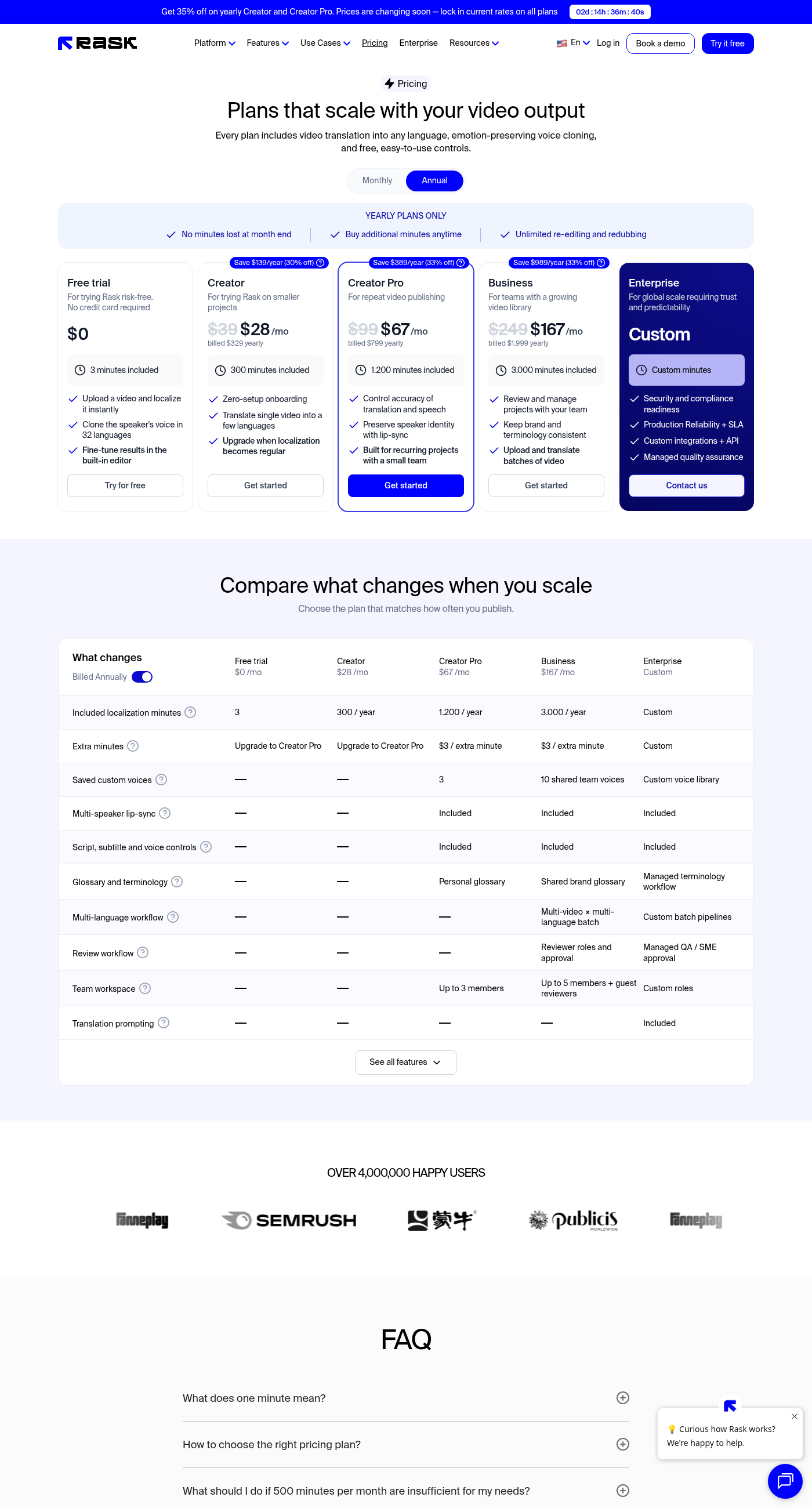
Rask AI is built for localizing a lot of video into many languages. Its pricing page advertises translation in 135 languages and voice cloning in 32. We cover where it fits in our best AI dubbing tools 2026 guide. Three things on its pricing page are worth knowing before you commit, or before you renew:
- Lip-sync is not on the entry plan. In the plan comparison table, multi-speaker lip-sync shows as included on Creator Pro, Business, and Enterprise, but not on Free or Creator.
- Minutes are the currency, and lip-sync uses more of them. Rask's FAQ says translation uses 1 minute per minute of final video per language, Standard Lip-sync adds 1 minute per video minute, and Enhanced Lip-sync (in beta) adds 3.
- The page flagged a price change. On September 28, 2026, a banner read "Prices are changing soon" with a countdown timer. The page's FAQ also lists different plan prices from the plan cards (for example, the FAQ quotes $60/month for a 25-minute Creator plan, while the card shows $39/month). Treat the checkout price as the real one.
Rask AI vs the alternatives: plans at a glance
Monthly-billing list prices as shown on each vendor's pricing page on September 28, 2026. Minutes and credits are not interchangeable across vendors, so compare them within one row, not across rows.
| Tool | Free tier | Entry paid plan | Next plan up | Lip-sync | Billing unit |
|---|---|---|---|---|---|
| Rask AI | $0, 3 minutes | Creator $39/mo, 25 min/mo | Creator Pro $99/mo, 100 min/mo | Creator Pro and up | Minutes |
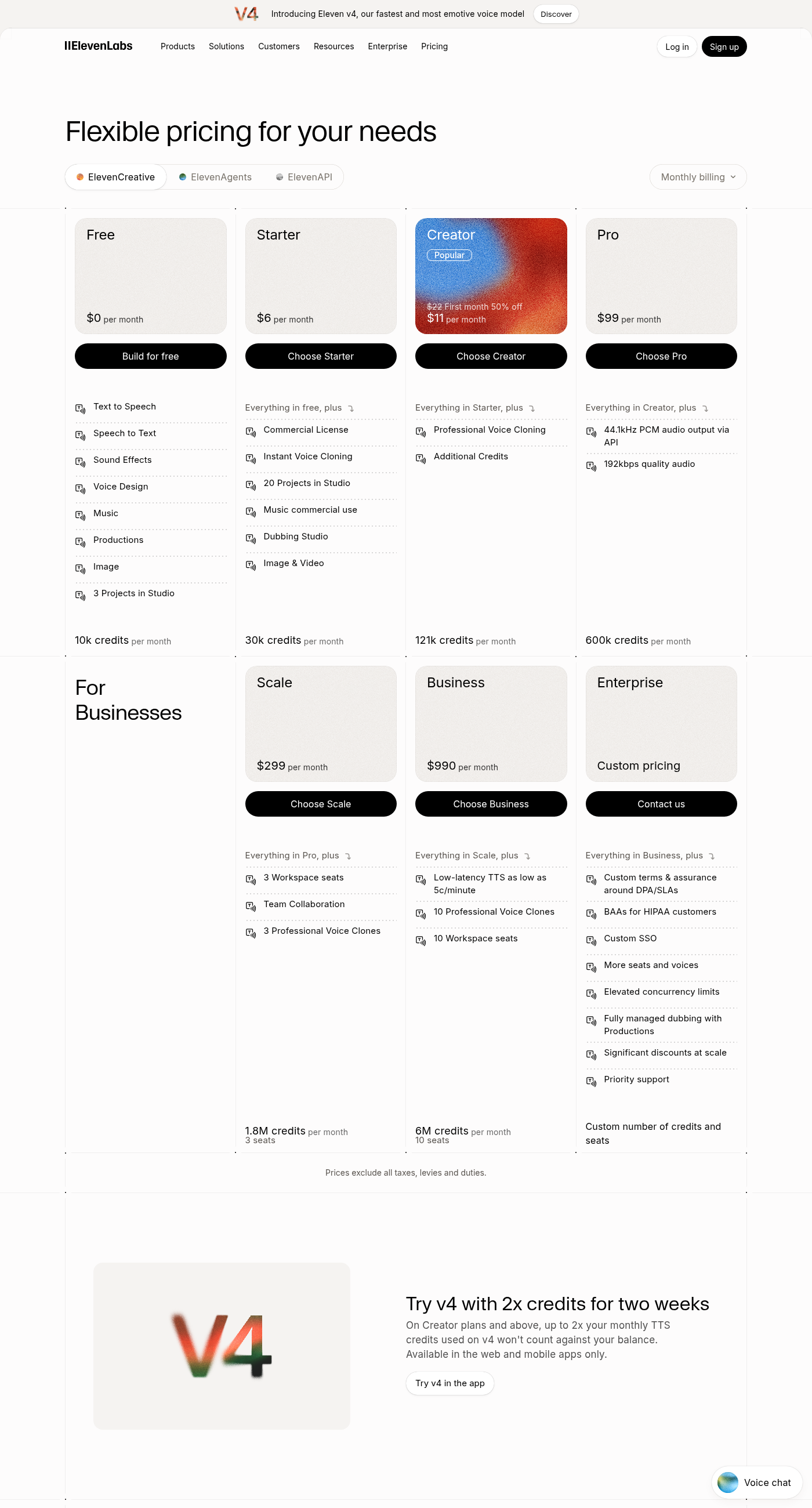
| ElevenLabs | $0, 10k credits/mo | Starter $6/mo, 30k credits (adds Dubbing Studio) | Creator $22/mo ($11 first month), 121k credits | Not listed on pricing page | Credits |
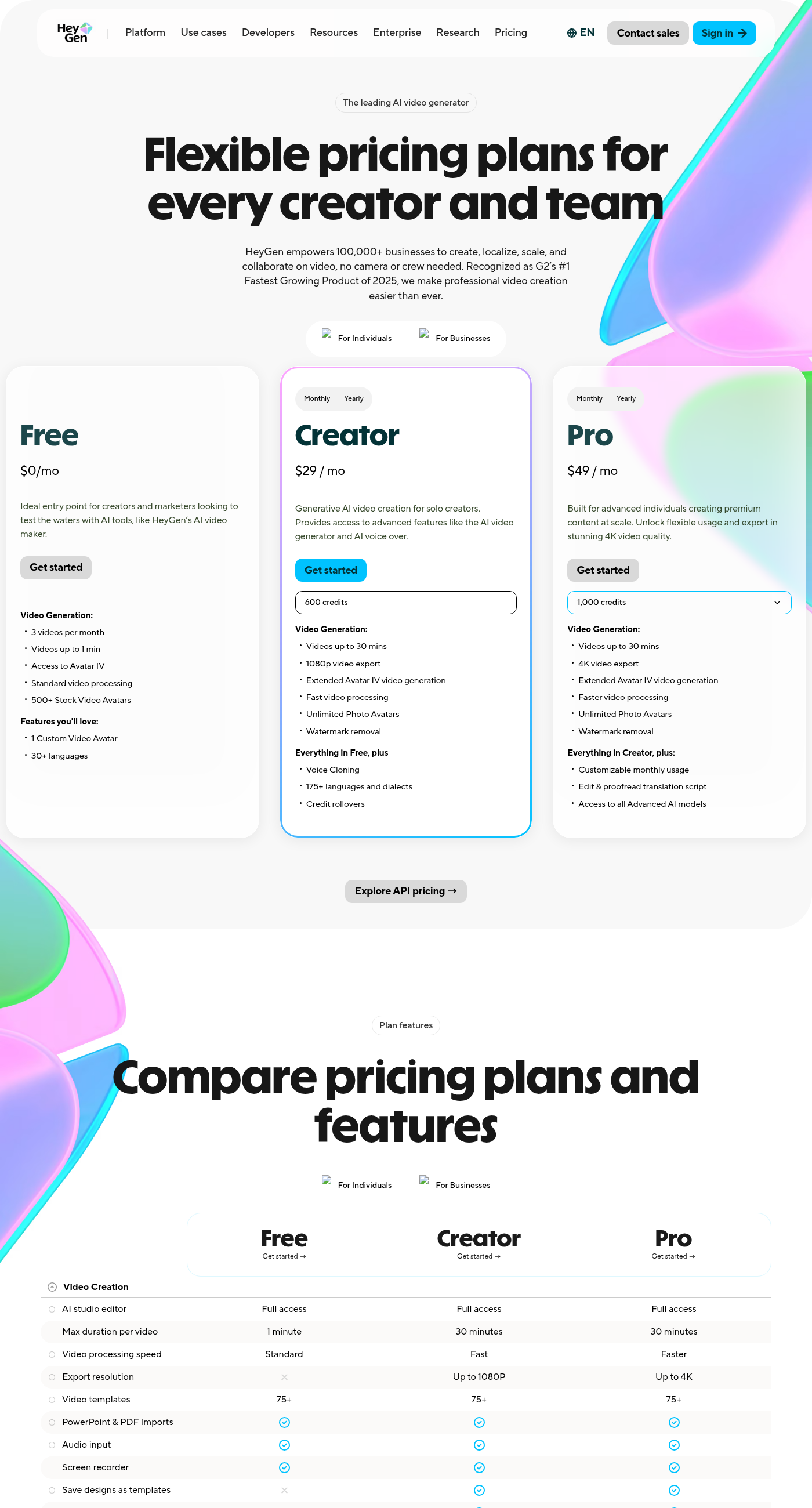
| HeyGen | $0, 3 videos/mo up to 1 min | Creator $29/mo ($24/mo billed yearly), 600 credits | Pro $49/mo, 1,000 credits | Premium feature; Free gets limited trial access; paid plan not stated (Unknown) | Credits |
Rask's yearly plans change the minute math. On the annual view, Creator is $28/mo billed $329 yearly with 300 minutes per year, and Creator Pro is $67/mo billed $799 yearly with 1,200 minutes per year. Annual plans also let you buy extra minutes ($3 per extra minute on Creator Pro and Business).
ElevenLabs: the alternative when the voice is the product
Best for: podcasts, audiobooks, courses, and voiceover where nobody needs to see a mouth move. The reason: ElevenLabs sells dubbing as part of a voice platform, and its entry price for Dubbing Studio is far below Rask's entry plan.
What the pricing page shows (September 28, 2026):
- Dubbing Studio is included from Starter ($6/month, 30,000 credits). Creator is $22/month ($11 for the first month) with 121,000 credits and adds Professional Voice Cloning.
- Dubbing is priced in credits per minute: 2,000 (automatic, with watermark), 3,000 (automatic, no watermark), 5,000 (Dubbing Studio, with watermark), or 10,000 (Dubbing Studio, no watermark).
- By our arithmetic from those published numbers, Creator's 121,000 credits would cover about 40 minutes of automatic dubbing without a watermark (121,000 ÷ 3,000), or about 12 minutes in Dubbing Studio without a watermark (121,000 ÷ 10,000), if you spent credits on nothing else. The page doesn't say whether "per minute" means per source minute or per target language, so treat these as upper bounds.
- Unused credits roll over for up to two months, per the pricing FAQ.
Pros: lowest entry price of the three for a dubbing workflow; the same credits also cover text to speech and voice cloning; well documented. For the full plan breakdown, see our ElevenLabs review and ElevenLabs Free vs Starter.
Cons: the pricing page lists no lip-sync feature, so on-camera footage keeps the original mouth movement. Credit math takes some work, and Dubbing Studio without a watermark uses credits fastest.
Paid link: the ElevenLabs link below is an affiliate link. If you sign up through it, we may earn a commission at no extra cost to you. Full disclosure policy.
See ElevenLabs plans (paid link)
HeyGen: the alternative when the presenter must look native
Best for: talking-head marketing, founder videos, and training clips where a mismatched mouth would distract. The reason: HeyGen sells translation as part of an avatar and video platform, and its site describes its AI Dubbing as "swap voices and languages with natural lip sync."
What the pricing page shows (September 28, 2026):
- Free: $0, 3 videos per month, videos up to 1 minute, 30+ languages, and "limited trial access" to premium features including lip-sync translation.
- Creator: $29/month ($24/month billed yearly), 600 credits, videos up to 30 minutes, voice cloning, and 175+ languages and dialects.
- Pro: from $49/month with 1,000 credits, 4K export, and the ability to edit and proofread the translation script.
- Business: $149/month plus $20 per extra seat, with SCORM export and LMS integrations for training teams.
Pros: the only one of the three that markets lip-synced dubbing alongside avatars; the widest language list of the three on its pricing page (175+ languages and dialects on Creator); script proofreading on Pro; SCORM export for training teams on Business.
Cons: the pricing page doesn't publish how many credits a translated minute uses (it says usage varies by model, duration, and complexity), so the minutes you get per plan are Unknown until you test. The pricing page also doesn't say which paid plan unlocks full lip-sync translation, so that's Unknown too; test it on Free before paying. Translation script editing is a Pro feature, not Creator.
When Rask AI is still the better pick
Minutes are simple to budget, and lip-sync plus a team workspace are bundled on Creator Pro. If you localize a large back-catalog into several languages at once and want lip-sync without a credit calculator, staying on Rask (or moving up to Creator Pro) can beat switching. Check whether the announced price change affects your plan before deciding.
Rask pros: clear minute-based billing; lip-sync, 3 saved custom voices, and a team workspace of up to 3 members on Creator Pro; the pricing page states which plans include lip-sync, which HeyGen's page does not.
Rask cons: no lip-sync on Creator; a pricing page that contradicts itself between cards and FAQ; a pending price change as of September 28, 2026.
Who shouldn't buy (or switch) yet
- You need lip-sync but only have budget for an entry plan. ElevenLabs won't give you lip-sync, and HeyGen's per-minute credit use is unpublished. Test on the free tiers first.
- You translate customer-facing, legal, or medical content. None of these tools replaces a fluent human reviewer. Budget for review whichever tool you pick.
- You don't have rights to the voice. Voice cloning on all three requires that you own the voice or have documented consent.
- You translate a few short clips a year. The free tiers (Rask's 3 minutes, ElevenLabs' 10k credits, HeyGen's 3 short videos) may be all you need.
How to choose in one minute
- Audio-only output (podcast, narration, voiceover) → ElevenLabs. See also our best AI voice generators 2026.
- Talking-head video that must look native → HeyGen (confirm on the free tier that lip-sync is included on the plan you'd buy).
- Big library, many languages, lip-sync, simple minute billing → stay on Rask Creator Pro.
- Starting from a messy recording → fix the transcript first; our AI transcription tools for podcasters guide covers that step.
Verdict
The best Rask AI alternative is the one that matches what's missing. ElevenLabs is the low-cost switch when you only need the translated voice. HeyGen is the switch when the on-screen mouth has to match. Neither is a clear upgrade on every axis, and Rask's Creator Pro remains a reasonable place to stay for lip-sync at volume. All figures come from the vendors' pricing pages on September 28, 2026. We didn't test output quality, so run a short clip in your target language on each free tier before paying.
How this page was made: AI assisted with drafting and structure. The pricing captures and screenshots were taken from the vendors' public pages, and every figure on this page was checked against them. No hands-on testing was done. See our buyer's guide for how we research tools.
Related reading
- Best AI Dubbing Tools 2026: ElevenLabs vs HeyGen vs Rask AI by use case.
- ElevenLabs Review 2026: every plan, cloning tiers, and licensing.
- Best AI Voice Generators 2026: the voice engines behind dubbing.
- Best AI Tools for Content Creators: the wider creator toolkit.
Get the weekly Smart AI Tools brief
Every week, the AI tools that actually shipped something useful, with a clear pick. Free.